
On this page
For TikTok distribution through MCP, map each approved asset to one managed account, create a videos_only bundle for each existing account, configure the slots, check readiness and submit. Track the actual delivered post URLs and returned publishing windows. Use analytics and your own conversion data to decide what to publish next.
Technical review: September 18, 2026, against the public documentation, current API schema and published npm package 1.15.1. Examples below are instructional templates, not customer results or a claim that a paid campaign was executed.
Your team has videos ready. The difficult part is keeping track of which account should publish each one, whether the schedule is valid, whether the work was actually delivered and whether anyone became a customer.
This tutorial connects those steps using TokPortal MCP. It is designed for an app team or agency running several purposeful TikTok accounts. We will use a fictional language app with two editorial programs: Spanish for travelers and Spanish for work. The workflow is concrete; the example is not a customer case study.
Sources & real examples
Public accounts, original posts and primary references. Each example is linked where it is discussed.
View all 6 sources and review notes
- MCP management tools ↗
Exact tool names, authentication and hard operating rules.
- Create bundles ↗
Existing-account bundles and purchase semantics.
- Configure videos ↗
Batch envelope, partial success, media and scheduling.
- Analytics ↗
Reporting tools and metric semantics.
- Webhooks ↗
Delivery events and verification.
- Spark ad-code requests ↗
Authorization-code workflow, separate from campaign execution.
Start with a distribution map, not a bulk-publish command
Write one line for each account: audience, recurring content promise, managed account ID, approved assets and campaign destination. Keep the account ID separate from its public handle because your integration needs a stable operational identifier.
The travel account could demonstrate ordering food, asking for directions and checking into a hotel. The work account could demonstrate introductions, meeting questions and short email phrases. The product appears where it helps solve the task. Each account gives viewers a reason to return.
This is AGD, Account-Generated Distribution: a content program organized around accounts serving distinct audiences. MCP can carry the plan into operations. It cannot supply a meaningful editorial distinction if the plan is simply the same promotional clip repeated everywhere.
Travel Spanish
People preparing a trip
Handle one real travel situation in each post.
Screen demonstration + spoken example
Order a vegetarian meal; find the station; check in.
Spanish at Work
Professionals learning useful phrases
Make one common work interaction easier.
Short scenario + product walkthrough
Introduce yourself; clarify a deadline; close a meeting.
Illustrative account briefs. These are planning examples, not real profiles or campaign results.
Step 1: Select eligible accounts and confirm the cost
Connect the official TokPortal MCP server and read your managed accounts with tokportal_list_accounts. Check platform and delivery state before assigning content. A public TikTok URL is not enough to identify an account the service can operate.
If you need new accounts, complete the TikTok account-creation tutorial first. For an existing delivered account, create a videos_only bundle using its real account_id. One bundle targets one account; do not put two account IDs into a request that accepts one.
Read current pricing, preview the exact bundle and include optional feature costs and managed-account coverage in the budget. Here is a six-slot preview for one eligible account. Replace the uppercase account placeholder before using it.
{
  "name": "tokportal_create_bundle",
  "arguments": {
    "dry_run": true,
    "body": {
      "bundle_type": "videos_only",
      "account_id": "YOUR_DELIVERED_ACCOUNT_UUID",
      "videos_quantity": 6,
      "auto_finalize_videos": false,
      "external_ref": "example-travel-spanish-week-01"
    }
  }
}
After approval, create the real bundle once and store its ID against the campaign. Repeat only for the other account’s separately approved scope. Keep retry identity stable: use a supported idempotency key for the logical purchase instead of issuing fresh create calls whenever the assistant loses track.
Step 2: Prepare a content manifest the assistant can verify
Give every asset a campaign reference, a destination account, an approved caption, its media location and a valid target day. Include the chosen sound and disclosure instructions when applicable. These are inputs the assistant can check before it changes anything.
For videos, use the public_url returned by upload or the documented external-video download flow. For a TikTok carousel, upload the images and use their storage_path values; also provide the required tiktok_sound_url. The sound must be a real track you have selected for the intended use.
Do not feed a source folder into the assistant with the instruction “post the best ones” unless the folder already expresses what is approved. A draft containing a false product claim can be technically valid. Keep your editorial approval separate from file validation.
Copy a content manifest
campaign_ref,account_label,managed_account_id,bundle_id,slot,format,asset_reference,approved_caption,target_day,approval_owner
travel-week-01,Travel Spanish,[real account UUID],[real bundle UUID],1,video,[uploaded public_url],[approved caption],[valid UTC date],[name]
travel-week-01,Travel Spanish,[same account UUID],[same bundle UUID],2,video,[uploaded public_url],[approved caption],[later valid UTC date],[name]
work-week-01,Spanish at Work,[other account UUID],[other bundle UUID],1,video,[uploaded public_url],[approved caption],[valid UTC date],[name]

Planning template only. Replace bracketed values. This worksheet is not the provider CSV-import schema; use the documented import columns if importing directly.
Step 3: Schedule within the actual publishing windows
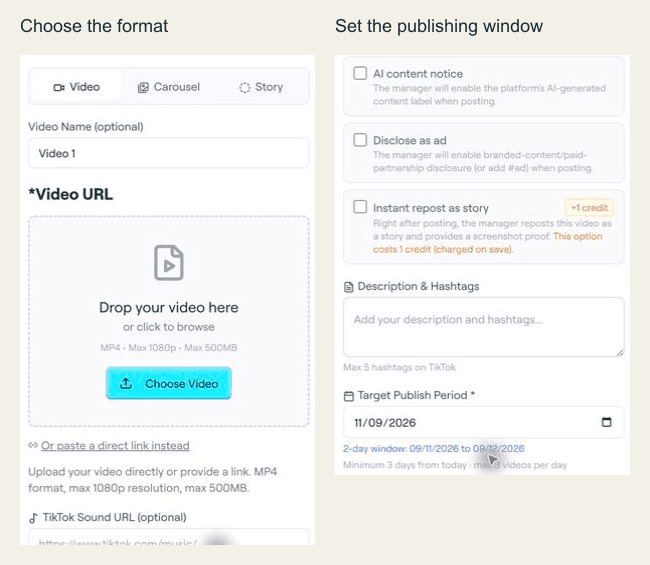
The API permits at most three videos targeting a given day per bundle. The earliest date is today plus one day for an existing or delivered account, or plus three while a new account is still being created, evaluated in UTC. You do not need to fill the maximum to run a useful pilot.
For the two-account example, six videos per account at one target per day gives you twelve distinct pieces of content to review. That is arithmetic for a plan, not a recommended universal posting frequency. Choose a pace your team can supply with useful, differentiated material.
target_publish_date starts a two-day window; it does not reserve a minute on the clock. Record the returned start and end values. If publication adjusts stale dates, save the adjusted schedule instead of displaying the old one in a client report.
For a launch requiring an exact instant, do not promise timestamp precision from this field. Decide whether the managed window fits the business requirement before selling the operation.
Step 4: Configure a batch and inspect every result
tokportal_batch_configure_bundle_videos accepts a bundle id and a body containing videos. Each item specifies its slot position and complete desired configuration. Start with a small batch you can inspect.
The batch auto_publish flag belongs at the root of body, beside videos. It does not belong inside each item. Keep it false while checking the first pilot, then submit deliberately after readiness is confirmed.
Read configured, errors and the individual results. A successful HTTP status or MCP response can contain a partially successful batch. Fix the failed positions and retry those, rather than resetting already-correct work.
These configuration calls are full replacements. Sending just a new caption through PUT can clear omitted configuration fields. Use the documented metadata PATCH tool for a supported narrow change, and read back the resulting slot before proceeding.
Step 5: Separate submitted work from delivered TikTok posts
Call tokportal_get_bundle_publish_readiness before tokportal_publish_bundle. Resolve the returned blockers. After submission, save the current bundle state, the submitted slots and any adjusted dates.
A bundle marked published has entered the managed workflow. Your customer-facing ledger still needs delivery evidence: actual post URL, delivered asset, current review state and the time you checked. Do not report “12 TikToks live” from a response that merely accepted twelve slots.
For a recurring integration, use the documented webhook events and signature verification, deduplicate deliveries and reconcile with resource reads when needed. Use the exact event catalog instead of inventing event names from English descriptions.
If manual review is selected, inspect work promptly and request corrections within the review window. Delivery review and pre-publication creative approval are different checks. The former confirms the ordered work; the latter decides whether the creative should be used at all.
Step 6: Measure distribution and conversion separately
Use the analytics tools available to your workspace, such as tokportal_list_account_video_analytics and tokportal_get_analytics_series. Keep the requested date range and metric mode explicit. Gained, cumulative and snapshot values answer different questions.
Compare posts of the same format and similar elapsed time since publication. A six-hour-old post and a two-week-old post are not a fair creative comparison. Preserve unavailable data as unavailable rather than silently replacing it with zero.
Then connect the campaign to your own landing-page and product analytics. Track visits, signup starts, completed onboarding and first purchases where your measurement supports them. Organic view counts do not prove app installs, and missing direct attribution does not prove no one converted.
For the travel series, suppose viewers watch but few visit. Check whether the next step is visible and whether the destination continues the lesson. If visitors arrive but abandon signup, work on that experience before increasing distribution volume. These are diagnostic possibilities, not measured outcomes from our example.
Can the same MCP workflow support Spark Ads?
The management catalog includes tokportal_create_video_ad_code_request. The ad-code documentation covers requesting authorization for an eligible delivered video. Preview the applicable cost and confirm the intended scope.
A Spark authorization code is not a launched ad campaign. Campaign setup, targeting, budget, permissions and paid performance need their own advertising workflow. Keep organic and paid metrics separate when you compare a promoted post with an unpromoted one.
Likewise, comments tools should serve an actual campaign need, such as answering a product question accurately. Do not turn distribution into fabricated testimonials or repetitive promotional replies. A larger tool catalog is useful only when each operation has a clear purpose.
Copy a distribution handoff prompt
Use my approved content manifest and existing TokPortal managed accounts. First validate account eligibility, media references, slot counts and dates. Preview management costs; wait for my approval before live purchases or publication.
Create one videos-only bundle per approved account. Configure complete slot payloads, inspect every batch result and resolve only failed items. Read back the saved plan and publish-readiness blockers before submission.
After submission, report accepted work separately from delivered posts. Record actual URLs, adjusted publishing windows, review deadlines and unresolved errors.
At the agreed reporting time, compare same-age posts using available analytics. Do not invent missing metrics, conversions, attribution or guaranteed reach. Recommend the next content test from the observed evidence.
Scale the workflow after the first loop closes
A useful pilot closes four loops: the right work was ordered, the approved content was delivered, the evidence was recorded and the team learned what to do next. Only then add accounts, countries or a larger creative batch.
For agencies, use that process as the service your client buys. Explain the audience program, deliverables, review responsibilities and reporting scope. The TikTok agency guide shows how to package a pilot; the white-label API guide covers turning the operation into a product.
Connect your content plan to real delivery
Start with an eligible account, a small approved batch and a current cost preview.
MCP practical guides: installation, GitHub and tools · create TikTok accounts · Instagram accounts and publishing · TikTok distribution · fix MCP errors.
Continue from publishing to conversations
TokPortal now brings received Instagram and TikTok comments into an account Inbox, with API replies and supported moderation controls. Eligible Instagram accounts also support Direct messages and keyword comment-to-DM. Read the comment-to-DM guide, keyword moderation and Instagram messaging before extending your workflow. New rules apply to new comments; account connection, Coverage, permissions and messaging windows remain required.
For connection setup, add https://app.tokportal.com/api/ext/mcp as a custom remote MCP server. TokPortal does not need to appear in the host’s plugin directory. The current setup guide includes Claude, Codex, Cursor and other clients.

Written by
Vincent Tellenne
Co-founder & CEO
Vincent is a co-founder and CEO of TokPortal. He works on the infrastructure and operating model behind scaled organic social media distribution.
Learn more about this topic with AI
Related Resources
How to Create TikTok Accounts with MCP: TokPortal Tutorial
Create a localized TikTok account with TokPortal MCP: country discovery, cost preview, profile setup, niche warming and delivery checks, with exact examples.
Instagram MCP: Create Accounts, Publish Reels and Carousels
Use TokPortal MCP for Instagram account creation and publishing. Configure Reels, swipeable carousels, music and Stories with the correct fields and checks.
TokPortal MCP Not Working? Fix Auth, Dry Runs and Posting Errors
Troubleshoot TokPortal MCP: 401 login loops, missing tools, read-only access, dry-run IDs, invalid dates, Instagram fields and partially successful batches.
Instagram Comment-to-DM Automation: Keywords, Private Replies and Inbox
Turn new Instagram comments into private conversations with TokPortal. Set a keyword, write your private reply and follow the conversation in your Inbox.
Instagram and TikTok Comment Moderation with Keyword Filters
Keep Instagram and TikTok comments manageable with keyword filters, exceptions and supported moderation controls in the TokPortal Inbox.
Instagram DM Inbox and API: Manage Conversations in TokPortal
Read and reply to Instagram DMs in one account workspace. Connect comments to private conversations through the TokPortal Inbox, API and MCP.