
On this page
Connect TokPortal MCP, read current country availability and pricing, then preview tokportal_create_bundle with dry_run: true. After you approve the live cost, create the real bundle, configure the account, resolve publish-readiness blockers and submit the work. A bundle ID is an order identifier; verify account delivery before treating it as a usable TikTok profile.
Technical review: September 18, 2026, against the public documentation, current API schema and published npm package 1.15.1. Examples below are instructional templates, not customer results or a claim that a paid campaign was executed.
You want a TikTok account for a specific market, and you would rather brief your AI assistant than manually assemble every request. That is the job TokPortal’s MCP account-creation workflow handles.
This tutorial uses an illustrative US launch for a language-learning app: one account, three approved product videos and a clearly defined audience. The JSON field names come from the published MCP schema. The example campaign is fictional; it is not a claim about an actual customer’s results.
Sources & real examples
Public accounts, original posts and primary references. Each example is linked where it is discussed.
View all 5 sources and review notes
- Bundle creation ↗
Bundle types, country codes, costs and creation semantics.
- Account configuration ↗
Profile inputs, image storage and platform differences.
- Management sandbox ↗
Version requirement, simulations and IDs.
- Advanced Niche Warming ↗
Target counts, flags and evidence.
- Video configuration ↗
Scheduling windows, content fields and review limits.
What does “create a TikTok account with MCP” mean?
Your assistant calls TokPortal to order managed account work. Local human community managers carry out the account operations, as explained in Vincent’s launch FAQ. MCP is the interface between your assistant and that service.
Receiving a successful create response does not mean TikTok has already delivered a live profile. You have created a bundle that needs configuration and submission, followed by fulfillment. Keep those stages visible in your project tracker so nobody tells a client “your account is ready” when only an order exists.
The tutorial covers accounts operated through TokPortal. It does not connect an arbitrary personal TikTok account just because you know its username. If you already have a delivered managed account, skip new-account creation and use the existing-account distribution workflow.
Step 1: Connect the MCP and check your workspace
Follow the TokPortal MCP setup guide for Claude Code, Codex, Cursor or a remote connector. Verify tokportal_get_credit_balance before asking for a purchase. Use write-capable access when you move to creation; a read-only connection cannot run a simulated write either.
Next, call tokportal_list_countries, tokportal_list_platforms and tokportal_get_credit_costs. Use the returned country code. The documented US code is USA and the UK code is UK; aliases exist, but a full country name is not the request format.
Ask what is available now. A launch tweet’s country count is a snapshot, not a permanent availability list. Account location specifies the operation you order. Your actual audience geography still depends on content, viewers and platform distribution.
Step 2: Choose one account and a small publishing pilot
account_only requests an account without video slots. account_and_videos includes publishing slots for that new account. videos_only targets one existing delivered account and requires its account_id. These choices are not interchangeable.
For our app example, three videos are enough to verify the workflow: a real product walkthrough, an answer to a common learner question and a demonstration of one travel scenario. Prepare the assets before buying a large publishing allocation. A slot is capacity to deliver work, not a finished creative.
One bundle equals one account. Setting videos_quantity: 3 buys three video slots, not three TikTok accounts. To operate several accounts, create a separate bundle and editorial brief for each. Start with one complete delivery before expanding the batch.
Step 3: Preview the account-creation cost
The tool call below previews the example bundle. It includes dry_run alongside body, not inside it. The external_ref is an illustrative campaign reference; replace it with your own unique order reference.
{
  "name": "tokportal_create_bundle",
  "arguments": {
    "dry_run": true,
    "body": {
      "bundle_type": "account_and_videos",
      "platform": "tiktok",
      "country": "USA",
      "videos_quantity": 3,
      "auto_finalize_videos": false,
      "external_ref": "example-language-app-us-pilot"
    }
  }
}
Inspect the returned credits_would_charge, credits_charged and cost_breakdown. A successful management simulation should identify itself as dry_run: true and charge zero credits. The quote can reflect workspace allowances, so it is more useful than a generic dollar estimate.
Include recurring coverage and any optional warming or publishing features in the budget. This example sets auto_finalize_videos: false for a review workflow. That flag does not prevent all later automatic finalization: delivered work entering review still has an approximately 72-hour review window.
Step 4: Create the real bundle after approving the quote
Once the scope and cost are approved, repeat the intended creation request in live mode and save its real bundle ID. Live creation spends credits immediately. pending_setup describes incomplete setup, not an unpaid shopping cart.
Use a stable idempotency_key for this supported write when implementing automated retries. If the connection times out, reconcile the result rather than creating a new purchase under a new identity. Your external_ref helps correlate campaign records, but it is not a replacement for request idempotency.
Discard the preview ID for live work. Dry-run identifiers begin with 00000000-0000-4000-8000- and do not represent stored accounts. A live request using one returns DRY_RUN_ID_IN_LIVE_REQUEST. Even chained simulations validate individual calls rather than maintaining a complete fake campaign database.
Step 5: Configure a profile with a clear audience
Use tokportal_configure_bundle_account with the real bundle ID and the requested username, visible_name, biography and profile-picture configuration. Keep the username within the documented characters and length, and the TikTok biography within 80 characters.
For the language-app example, a profile promise such as “Practical Spanish for your next trip” gives a viewer a reason to follow. The account should accurately represent the app or authorized campaign. Do not write a biography that pretends the account is an independent customer giving an unsolicited recommendation.
Upload a profile image you own and use the image upload’s storage_path in profile_picture_url. This differs from video configuration, which uses an uploaded video’s public_url. Read back the saved configuration and warnings. In particular, link_in_bio is an Instagram configuration field; this endpoint does not promise to add a TikTok bio link.
Optional: Add Advanced Niche Warming with explicit targets
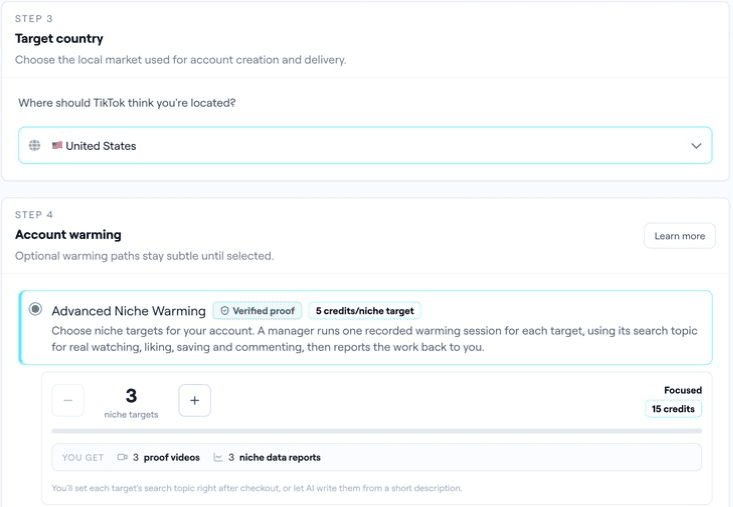
If you purchase Advanced Niche Warming, include wants_advanced_warming: true at bundle creation. Supply 3–30 distinct search terms in multiples of three, each 2–50 characters, or purchase a target count and configure the targets before publication. Terms without the flag are rejected.
Here is a separate account-only preview illustrating three relevant targets. It is an alternative request, not an extra call to run after creating the previous bundle. Do not accidentally buy a second account while following an optional example.
{
  "name": "tokportal_create_bundle",
  "arguments": {
    "dry_run": true,
    "body": {
      "bundle_type": "account_only",
      "platform": "tiktok",
      "country": "USA",
      "wants_advanced_warming": true,
      "advanced_warming_terms": [
        "travel Spanish",
        "beginner Spanish lessons",
        "Spanish pronunciation"
      ]
    }
  }
}
Read the warming documentation and inspect session records and evidence through the supported account tools. Thirty targets is not a promise of thirty sessions, and recorded activity is not proof of a particular reach increase. The useful question is whether the ordered work was delivered and what subsequent posts actually do.
Step 6: Configure content, check readiness and submit
Configure each approved video with tokportal_configure_bundle_video. Slots are numbered from 1. Use a valid media URL, an accurate caption and a current schedule. While the account is still being created, the earliest target date is today plus three days in UTC; for delivered or existing accounts, it is plus one day.
The target date starts a two-day publishing window. It is not an exact posting timestamp. At most three videos can target one day within a bundle. For this pilot, one video per target day makes reviewing the delivery straightforward.
Call tokportal_get_bundle_publish_readiness, resolve the returned blockers, and then submit with tokportal_publish_bundle when ready. Inspect returned state and any schedule adjustments. Submission into the managed workflow is not evidence that a public TikTok post is already live.
Copy a complete account-creation brief
Goal: one TikTok account for [audience] in [country].
Account promise and relationship to the brand: [brief].
First three approved assets: [links and captions].
Use live country discovery and current credit costs. Preview the proposed bundle with dry_run: true and show immediate and recurring costs. Wait for my approval before spending.
After approval, create once and record the real bundle ID. Configure the profile and assets, read them back, check publish readiness and resolve blockers. Do not claim an account or post is delivered from a create/publish response alone.
Report: real IDs, requested scope, charges, current status, blockers, delivery evidence and next action. Never reveal credentials as part of normal setup.
Turn the pilot into an AGD account network
After delivery, review the actual account, public post URLs and available analytics. Check that the content and profile match the brief before discussing scale. Keep a separate record of landing-page sessions and signups; video views alone do not tell you whether the app acquired customers.
This becomes AGD, Account-Generated Distribution, when each account has a purposeful content program. A second account might teach workplace Spanish through different demonstrations. Expand because the audience needs another useful series and your team can maintain it, not because account creation is easy.
Account continuity and replacements follow the current replacement policy. Neither human operations nor MCP guarantees immunity from restrictions. Read actual account and ban states rather than inferring a ban from a disappointing view count.
Preview your first TikTok account
Connect the MCP, check current availability and price one clearly scoped account before ordering.
MCP practical guides: installation, GitHub and tools · create TikTok accounts · Instagram accounts and publishing · TikTok distribution · fix MCP errors.

Written by
Vincent Tellenne
Co-founder & CEO
Vincent is a co-founder and CEO of TokPortal. He works on the infrastructure and operating model behind scaled organic social media distribution.
Learn more about this topic with AI
Related Resources
Instagram MCP: Create Accounts, Publish Reels and Carousels
Use TokPortal MCP for Instagram account creation and publishing. Configure Reels, swipeable carousels, music and Stories with the correct fields and checks.
TikTok MCP Distribution: An AGD Workflow for Multiple Accounts
Build a TikTok distribution workflow with MCP: account routing, approved media, batch scheduling, delivery checks and analytics for an AGD campaign.
TokPortal MCP Not Working? Fix Auth, Dry Runs and Posting Errors
Troubleshoot TokPortal MCP: 401 login loops, missing tools, read-only access, dry-run IDs, invalid dates, Instagram fields and partially successful batches.