
On this page
Create a TikTok account in another country by having it created and operated there. With TokPortal, choose an available market and manage the account from your dashboard, API or AI agent while local operators handle the work on real devices. You can work from abroad without setting up a VPN.
Create locally, manage from wherever you work
Sources & real examples
Public accounts, original posts and primary references. Each example is linked where it is discussed.
View all 3 sources and review notes
- TikTok account region ↗
Official region-setting route and conditional requirements, inspected September 15, 2026. It does not promise a country-exclusive audience.
- TikTok recommendations ↗
Platform explanation of recommendation inputs; no single signal is a guarantee of reach or conversions.
- A team's audience-location question ↗
Public 2022 self-report used to illustrate a real operational question. Its causal explanation and outcomes are not independently verified.
Your team does not have to move to the United States to run a US TikTok presence. TokPortal coordinates account creation and operation with local operators on real devices in the market you select. You prepare the brand, content and budget; your dashboard keeps the account and publishing work in one place.
This works for a brand entering a market, a creator building a local presence, or an agency managing several clients. For a US launch, use the launch plan and downloadable brief to turn your audience, assets and next step into a practical setup.
US TikTok account, US viewers and US customers are three different goals
If you search for a “TikTok USA account,” first decide what you are trying to change. Account region is a platform setting. The location where someone operates the account is an operational fact. Audience geography is an observed result. A US customer is a business outcome. None is a substitute for the others, and a good launch brief names all four.
A US-focused skincare brand, for example, might need a local operator, English-language demonstrations, prices in dollars, delivery within the United States and a landing page that accepts its customers' payment methods. Opening an account addresses only part of that work. A successful video about a product unavailable in the viewer's state can still produce no useful orders.
Start with the account-region information in TikTok's own help center and check the settings actually available to your account. Do not build a launch around an unverified promise that changing a VPN or buying a phone number changes every aspect of account eligibility. Marketing distribution and eligibility for creator monetization are separate questions.
Can you change an existing TikTok account's region?
TikTok's current account-region guide describes an in-app path through Profile → Menu → Settings and privacy → Account → User Information → Account region, when the option is available. It also describes a browser option under Settings → Manage account. The platform may require that you have been in the new region and active there, meet its age requirement and settle rewards from the previous region. A later change may not be available.
If you already operate an account, inspect that supported route before creating another profile solely to change a setting. If your business needs a separate local content operation, brief that as its own project. Neither choice removes the need to make content that is useful to the audience you want.
Build a local content brief before ordering more accounts
The question above is useful because it separates the intended audience from the audience the team actually observed. It cannot establish why their distribution happened. Treat forum accounts as leads for questions to investigate, then use your own reporting and the platform's documentation to choose a next step.
Write down an audience narrower than “Americans.” A budgeting app could target US college students sharing rent, first-job employees learning about paychecks, or parents planning weekly groceries. Those audiences ask different questions and respond to different demonstrations. Pick one for the first test and make sure the product can serve it.
Prepare three concrete demonstrations. For the student example, show a real split-expense flow, a realistic grocery budget and how to record a reimbursement. Use your actual product, anonymized test data and amounts clearly presented as examples. Avoid filming a generic phone screen and adding “USA” to the caption: the useful detail is the situation being solved.
Then localize the destination. Match the language, currency, availability, device-store link and promised offer. If the video says “split rent with roommates,” the first screen after the click should help with that task. Keep the same campaign label in the account brief, published link and analytics so you can inspect the full journey.
Copy a US account launch brief
Audience: [specific US customer and problem]
Product available in: [states/territories; iOS/Android/web]
Account role: [one editorial promise]
Operator and market: [owner; requested country]
Three original demonstrations: [1 / 2 / 3]
Landing page and currency: [URL; USD or appropriate choice]
Campaign tracking: [account-specific UTM; conversion event]
Approver and rights: [name; asset permission]
Review date: [date; compare the same age of posts]
Decision: [continue / change the brief / pause expansion]
Measure target-country attention without inventing attribution
Keep two separate scorecards. The platform scorecard records posts delivered, views, available audience geography and meaningful comments. The business scorecard records attributable visits and the conversion that matters to you, such as a qualified demo request, an activated user or a first purchase. Document which metrics your account and analytics setup actually expose.
Illustrative calculation: suppose a reporting view shows 12,000 views and 45% from the United States over the same period. That implies about 5,400 US views within that report. It does not imply 5,400 unique people, clicks or buyers. If your website separately records 90 visits from the account's tagged link and six signups, the measured visit-to-signup rate is 6 ÷ 90, or 6.7%. You still cannot attribute those signups to a particular video without suitable tracking.
Compare posts at a similar age and keep paid boosts separate. A post published yesterday should not be judged against a six-week-old post's lifetime total. Small samples can move sharply after one viewer shares a video. Use comments and landing-page behavior to form your next hypothesis; do not treat a single country-share movement as proof that an account is “fixed.”
When a US account becomes part of an AGD strategy
Account-Generated Distribution (AGD) is an organic growth model where content is distributed through a network of purpose-built social accounts instead of relying on a single brand account or external creators for reach. A local account can be one part of that network. Its purpose should remain clear: one audience, one recognizable promise and content worth returning for.
In the budgeting-app example, a student money account and a family grocery account could justify different briefs. Ten copies of the same product commercial do not create ten distinct audience propositions. Before adding the second account, check whether your team can produce another useful series and review its results separately. Use the multi-account planning guide to estimate that workload.
If you also publish on Instagram, write a platform-specific launch brief rather than assuming that a TikTok account setting transfers. Reuse your research and approved footage where appropriate, then adapt the edit, caption and publishing workflow. The UGC distribution comparison explains when organic accounts, creator distribution and paid amplification solve different problems.
Set up your account in the market you choose
Choose a platform and available country, prepare the profile and review the cost in TokPortal.
What country and VPN settings can tell you
TikTok says it estimates location using information such as SIM region, IP address and device settings. An IP address is one input, so changing it alone is not a reliable plan for a local account operation. See TikTok's explanation of location information.
Account location also does not select every viewer. TikTok's recommendation guide describes several factors, including viewer interactions, content information and location. Local operation gives you a presence in the market; your content still has to earn attention. It does not guarantee country-only views, reach or sales.
How to create your account in another country
Choose the audience and check available markets
Decide which country and audience you want the account to serve. Open TokPortal and check current country availability for TikTok or Instagram before planning the launch.
Choose the account and review the order
Select Account Only if you need account creation, or include content slots when you also want publishing. Check the setup cost, ongoing Coverage and any optional services before confirming the total.
Configure your brand and submit the setup
Prepare the requested handle, display name, bio and profile image. Complete the configuration in your dashboard and submit it when ready. Local operators carry out the account work in the selected country; follow its status in TokPortal.
Prepare content and keep the account operating
Use content you own or have permission to publish, with captions suited to the audience. Configure the available slots and dates, then follow publishing and delivery. Review account and content analytics alongside visits and conversions in your own business.
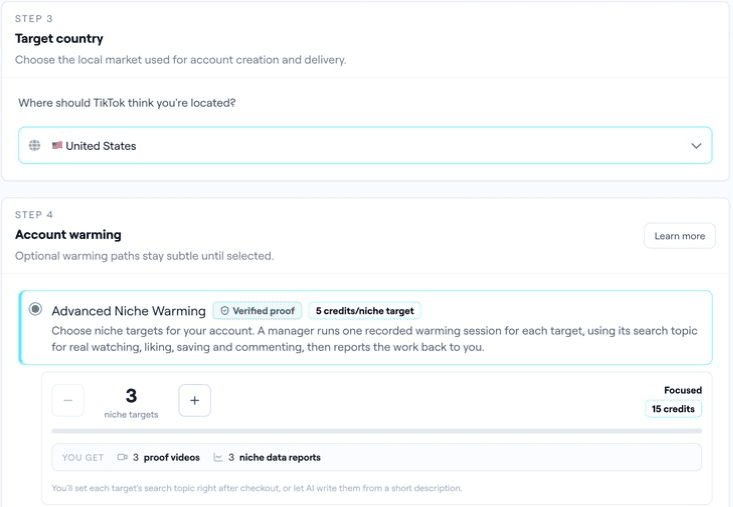
Keep the launch date flexible until the account is delivered. Use the current pricing and network calculator and Coverage terms for the full budget. Optional Advanced Niche Warming can be selected when it fits your plan; review its current scope and cost in the app.
Automate the same workflow with an API or AI agent
You can start in the web dashboard and automate later. TokPortal exposes the account and publishing workflow through its REST API and MCP server, so your team can use code, an AI assistant or a no-code workflow.
For a first technical step, preview a US TikTok account order. The recipe checks available countries and returns the workspace's current quote with dry run. Its simulated IDs are for previews only; creating a real account is a separate paid operation.
For n8n, import the account preview workflow. It runs manually and stops at the quote. The broader n8n guide covers the community node and operational templates; Make and Zapier use HTTP steps.
Add accounts and content when the process is ready
Keep each account's brand, market and content identifiable as you grow. The bulk creation guide explains ordering several TikTok or Instagram accounts in one country per request. Check the total across platforms before buying.
For a delivered TokPortal account, validate an MP4 in an existing content slot before publishing. Organize approved assets by account, bundle and intended date, then follow the results. Publishing uses the available workflow and dates; it is not a promise that every account posts simultaneously.
Frequently asked questions
Can I create a US TikTok account while living elsewhere?+
Do I need a VPN or a local SIM myself?+
Will every view come from the country I select?+
How much does creating an account cost?+
How long does account creation take?+
Can I create Instagram accounts too?+
Do I receive login credentials automatically?+
Build your local presence from abroad
Bring your brand and content. Choose your market and review the account setup in TokPortal.

Written by
Vincent Tellenne
Co-founder & CEO
Vincent is a co-founder and CEO of TokPortal. He works on the infrastructure and operating model behind scaled organic social media distribution.
Learn more about this topic with AI
Related Resources
Best Platforms to Distribute AI UGC Videos
Compare UGC production, creator posts, schedulers, paid ads and managed AGD accounts. Real examples, rights checklist and an interactive content planner.
How to Manage Multiple TikTok Accounts for One Brand
Build a multi-account TikTok and Instagram plan with real examples, an account register, a content-capacity calculator and an AGD review process.
Related Countries
From the guide to your first campaign
You make the content.
TokPortal runs the account operations.
Create and operate TikTok and Instagram accounts in your target market. Local operators handle the account work and native publishing. You control the brief, content and campaign from the dashboard, API or MCP.
- 01Choose your market
- 02Define each account
- 03Schedule your content
Review market availability and pricing before ordering. No reach forecast is built into your plan.