
On this page
You can build an app in a weekend. Finding a repeatable way to put it in front of the right people can take much longer.
Now imagine opening one conversation and asking:
Show me which of my TikTok accounts are improving. Find the three content angles worth another test. Prepare next week's posts for those accounts, tell me what they will cost, and wait for my approval.
That is a useful job for GPT Astra. It can read the numbers, work with your creative files, and use TokPortal's MCP connection to prepare and coordinate the account operations.
This guide builds that workflow from the first connection to a repeatable publishing and measurement routine. There are real, anonymized examples from three niches, copyable prompts, and an actual Image 2.5 carousel made for the tutorial.
About the 1,000: that is the scale this operating plan is designed toward, not a claim that a 1,000-account Astra deployment was tested. TokPortal's bulk endpoint accepts up to 100 accounts per platform in one request. Your workspace's capacity, account availability, credits and service eligibility still determine what you can create and operate. Start with one working account before expanding the system.
1. Understand what you are connecting
There are three different jobs here.
- GPT-6 Astra handles the reasoning. It turns a brief into a plan, examines images and results, and chooses the tools needed for the next step.
- GPT Image 2.5 Flare creates the images. Astra can coordinate image generation when your host has that capability. Selecting Astra alone does not automatically enable a separate image model.
- TokPortal handles the account operations. Its MCP exposes account setup, content configuration, publishing tasks, analytics, warming sessions, comments and ad-code requests. Local account managers carry out the platform work.
MCP is simply the connection that makes those TokPortal actions available inside the AI conversation. You should not need to build an integration or write a script to follow this tutorial.
It also means “publish” is a workflow, not an instant teleportation of a file into TikTok. An account needs to exist, content needs to be ready, the task needs to be executed, and the delivered post needs to be checked.
The exact model names in OpenAI's documentation are GPT-6 Astra and GPT Image 2.5 Flare. Check their availability in your account and host before starting. The TokPortal side is documented in its MCP guide.
2. Connect TokPortal, then ask a deliberately small question
Use a desktop AI host that supports remote MCP. The steps below follow the Codex desktop setup documented by OpenAI; another host can use the same TokPortal server address.
- Open Settings → MCP servers → Add server.
- Name the connection TokPortal.
- Choose Streamable HTTP and enter https://app.tokportal.com/api/ext/mcp.
- Save the server and restart it if the interface asks you to.
- Use Authenticate to complete the TokPortal login. Read-only access is enough for the first inventory and analytics prompts. Creating accounts or publishing requires write access.
- Open a conversation, select GPT-6 Astra if available, and check that TokPortal appears among the connected MCP tools. In the documented Codex flow, typing /mcp lists the connections.
Keep credentials in the connector's authentication flow. A TikTok password, an API key pasted into the chat, and an MCP server URL are three different things. You only need the public server URL for the OAuth connection.
Setup references: OpenAI's MCP setup and TokPortal's remote connector.
Your first prompt
Use TokPortal to check my available credits, then list only the first three accounts or bundles I can access. Tell me which workspace you are reading. Do not create, publish, refresh analytics, or modify anything.
A good response contains information returned by TokPortal. It should not merely explain what it would do. If no tool was called, ask Astra to check the MCP connection before continuing.
The documented balance tool is tokportal_get_credit_balance. That is a useful diagnostic name if the agent seems confused. You do not need to memorize the rest of the catalog.
Give the conversation a working agreement
For this project, you may read account state and analytics, organize local files, and prepare drafts. Before any paid action or public action, show me the exact accounts, content, schedule, credit estimate and expected result. Wait for my approval.
Keep a ledger of returned account IDs, content IDs and task states. If an operation times out, check its status before retrying. Never treat a draft, scheduled task or submitted task as a live post.
This is especially helpful when you return to the project three days later. The ledger should live in a project document or spreadsheet that you control, rather than depending on a long conversation remembering everything.
3. Build one account you can actually learn from
We will use a small focus-timer app as the running example. Its audience is English-speaking students and people who struggle to start a work session. The first account will be operated in the US.
The brief needs to be narrower than “productivity content.” Give Astra a person, a recurring problem, a useful format and a product that can genuinely help.
Plan one US TikTok account for a focus-timer app. Audience: English-speaking students who keep putting off the first five minutes of work. Voice: practical, warm and specific. No diagnoses, miracle claims or invented testimonials.
Propose a profile, three content pillars and six first-post ideas. Use the live TokPortal country and platform lists, then check the current credit costs and account eligibility. Prepare the configuration and a cost breakdown. Do not create anything yet.
The three pillars might be starting a task, reducing distractions, and showing a small study routine. Each gives the account enough variety without changing audience every day.
Before approving creation, look for the country, platform, account quantity, profile choices, optional warming and upload allowance in the summary. Ask what is charged now, what is recurring, and what will be charged later. A low setup price is not the total cost of running the account.
TokPortal calls these orders bundles. One account bundle produces one account. The documented creation step is a paid checkout; merely creating a bundle is not a free draft. Tell Astra to keep its proposal local until you approve the order.
Once approved, let it create the bundle, finish the required configuration, check readiness and submit the setup. Record the returned IDs. When the account is delivered, verify its profile and country configuration before scheduling a week's content.
Product reference: bulk account creation and its checkout rules.
4. Use Advanced Warming with a niche you can explain
For this focus-timer account, useful search targets might include “study with me,” “desk setup for studying,” and “how to start homework.” They describe content the intended audience might actually watch.
Advanced Niche Warming lets you specify those targets. The account manager records the work on the platform: starting from the profile, searching the target, watching results and completing the required interactions. Verified targets produce reports, and the session has an aggregate report.
The documented schedule spreads the targets over three calendar days in the manager's timezone. Standard purchases run from three to 30 targets, in multiples of three. The standard price is five credits per target, with the current credit-cost response taking precedence if your workspace has a different effective rate.
Suggest six distinct warming targets for this focus-timer audience. Explain why each belongs. Remove broad motivational keywords and anything unrelated to the app.
Show me the current cost for six targets on this account. After the approved session is complete, retrieve its report and available recordings. Summarize what was verified, what remains pending, and anything that looks off-topic.
Six targets at the standard rate are 30 credits for that account. Multiplying that by 100 accounts would be 3,000 credits for warming alone. That arithmetic is one reason to settle the niche on a small group first.
Warming gives you an observable preparation process. It does not prove that TikTok will send your next post to a particular audience, and it does not fix a weak creative. Judge the content using the audience and performance data that arrive afterward.
Astra can generate target suggestions, retrieve sessions and read the reports. The useful check is whether the evidence matches the plan, not whether the agent says “warming completed.” See the Advanced Niche Warming documentation for the recorded workflow and pricing rules.
5. Make a slideshow people might save
For a founder, slideshows are an approachable first format. You can explain one small problem without filming yourself, and you can change the opening idea without rebuilding the whole creative.
Start with the writing. Asking for five images before deciding what the five images need to say usually produces five attractive slides with no reason to swipe.
Write a five-slide TikTok carousel for our focus-timer account. The idea: make starting smaller, rather than making the to-do list longer.
Slide 1 should name a recognizable frustration. Slides 2 and 3 should each give one concrete action. Slide 4 should show a real screenshot of our timer doing that job. Slide 5 should give a useful next step, with a light product mention only if it fits.
Keep each headline under 12 words. No fake results or productivity percentages. Show me the complete slide copy before generating images.
Then give Image 2.5 an art direction
The first three slides below were actually generated for this guide with GPT Image 2.5 Flare. They are creative examples, not customer posts and not performance evidence.
The direction is intentionally specific: warm uncoated paper, oversized black type, a red kitchen timer, hard daylight, generous margins. A consistent visual system makes a sequence feel like one thought.
Use GPT Image 2.5 Flare to make the approved opening slides as separate portrait images. Use warm ivory paper, bold black condensed typography and one red practical object per slide. Keep text large enough to read on a phone. No glossy futuristic interface or decorative neon.
Slide 1: “Your to-do list is not a starting line.” Show a red timer surrounded by crumpled notes. Slide 2: “Shrink the task. Keep the appointment.” Show one small, specific first step. Slide 3: “Set five minutes. Give yourself a way in.” Show the timer beside an open notebook.
Keep the palette, margins and typography consistent. Save each slide separately. For the product slide, use my real app screenshot; do not invent an interface.
The generated samples are also available individually: slide 1, slide 2 and slide 3.
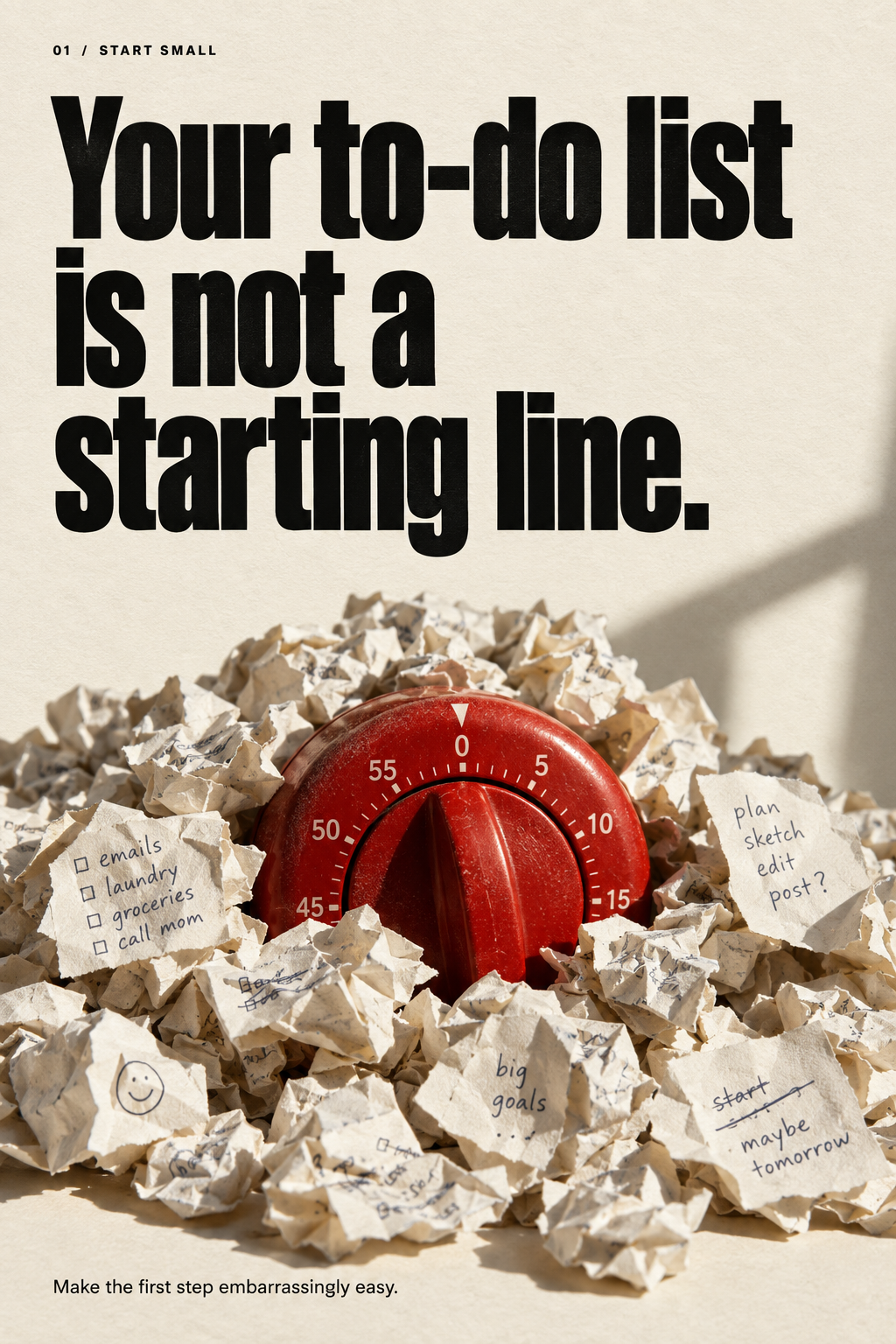
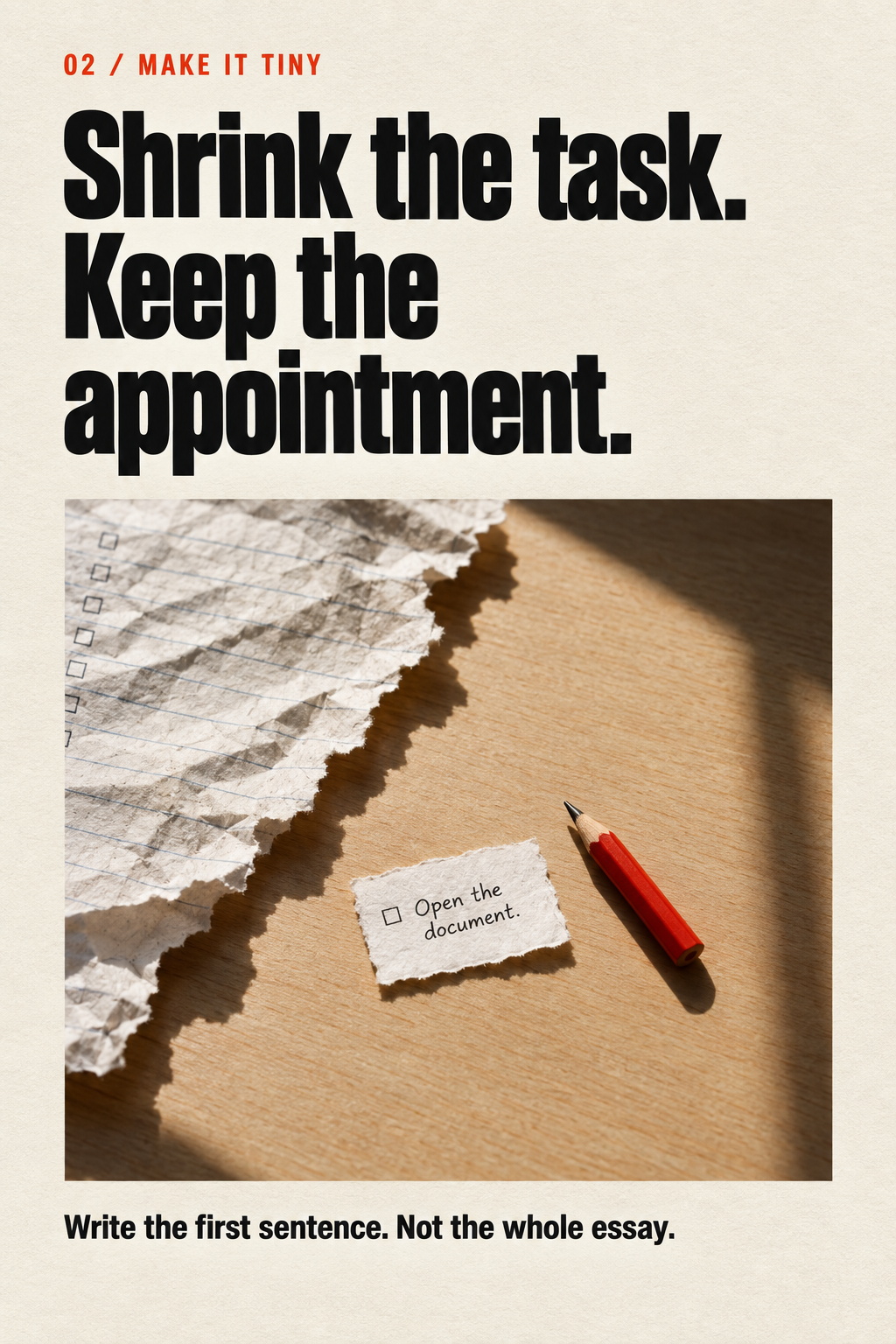
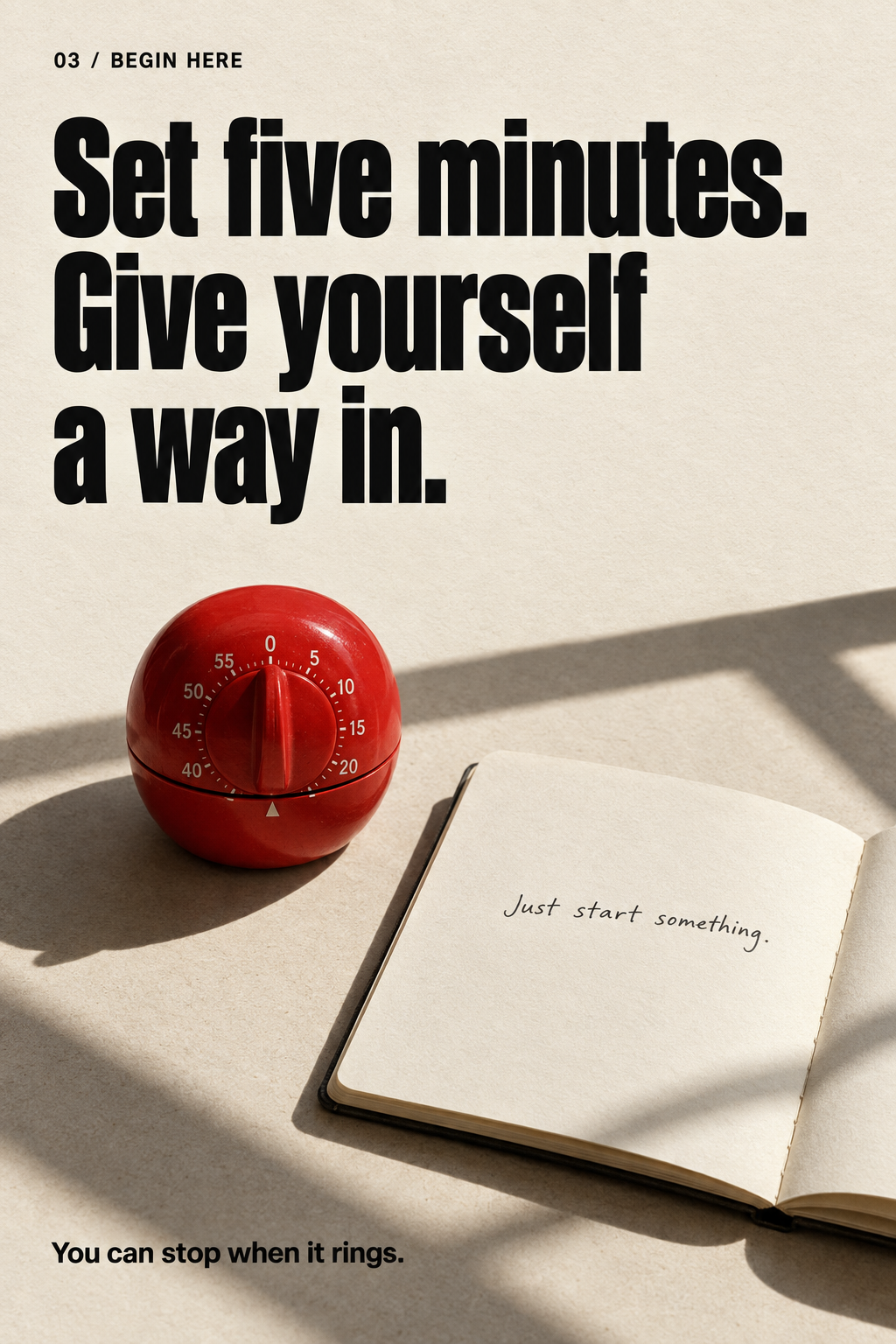
The sample uses 1024 × 1536 portrait images. That is the creative export size used here, not a claim that TikTok requires that exact ratio. Keep the important copy away from the edges and review the final sequence in the publishing workflow.
If your host cannot access the requested image model, Astra should say so. Generate the files in a supported image tool and attach them to the project. TokPortal can still handle the upload and content workflow; image generation and account management are separate capabilities.
The review that saves you a wasted post
- Read the images, not just the prompt. Check spelling, contrast, accidental extra words and whether a line break changes the meaning.
- Swipe them in order. Does each slide earn the next one, or repeat the same advice?
- Check the product claim. The timer screenshot should show a feature that exists in the app.
- Remove unearned proof. No fabricated review, before-and-after result or customer quote.
- Decide on sound and disclosure. Choose appropriate audio and any required AI-content or commercial-content labels before submission.
A beautiful first frame can get attention. The middle of the carousel still needs to deliver the reason someone stopped.
6. Upload, schedule, and verify the live post
Now give Astra the approved files and a precise destination. “Post these on TikTok” is too vague once you have more than one account.
Prepare these approved slides for the US focus-timer account we created. Use the saved account ID from our ledger. Keep the exact slide order and approved caption.
Upload the files to TokPortal, configure one slideshow, and propose a publishing window in America/New_York. Check account eligibility, upload capacity, sound requirements and publish readiness. Show me the preview, total cost and destination account. Stop before submission.
TokPortal supports direct image uploads and importing images from accessible URLs. For slideshows, its upload response includes the storage reference the content configuration needs. Let Astra use the returned values; a path to a file on your laptop is not automatically a file TokPortal can read.
This is one of the few technical details worth knowing: the upload has to succeed before the post can use the image. A chat preview is not an uploaded asset.
After approval, ask it to submit the prepared content and update the ledger. The record should include the account, content ID, requested time window, current status and eventually the delivered TikTok link.
Then inspect the delivery: correct account, correct slide order, readable text, caption and sound. A scheduled task is not yet a published result. A live link is stronger evidence than a cheerful “all done” message.
If a submission times out, have Astra retrieve the existing task before sending another one. TokPortal supports idempotent requests for supported writes: the same logical action should not become a second order simply because the first response was slow.
References: media upload and the MCP publishing tools, including tokportal_get_bundle_publish_readiness and tokportal_configure_bundle_video.
7. Read the results without fooling yourself
The easiest analytics mistake is to ask, “Which post is best?” without defining the period or the outcome.
A three-month-old video has had more time to accumulate views than yesterday's slideshow. A high-view post can attract people who never want your app. And a stale snapshot can look like stalled growth when the data simply have not refreshed.
Read TokPortal's analytics contract first. Compare posts published in the last 14 days, grouped by account and content pillar. Show snapshot freshness, available metrics and missing data.
For each group, give me the median views, the strongest post and the weakest post. Separate lifetime post views from views gained during a measured period. Compare posts at a similar age where the data allows it. Do not invent retention, audience location or conversions when those fields are unavailable.
Recommend three follow-up experiments. Explain the observation behind each one. Read only; do not schedule them yet.
tokportal_get_analytics_contract tells the agent how to interpret the data. The dashboard, series and account-video tools then provide different views of performance. The series contract distinguishes cumulative values, gains and snapshots; those are not interchangeable.
Some analytics features depend on your plan. Ask Astra to report those limits directly instead of filling a missing column with a confident guess.
Three real examples, anonymized
The following examples were checked against TokPortal's stored post analytics and their linked finalized deliveries. The delivery links resolve to the same TikTok post IDs. Images are frames from the submitted media, cropped and anonymized for this article. The numbers are transcribed from the stored analytics snapshots; the layouts are editorial extracts, not screenshots of a customer dashboard.
These are selected examples, not a representative sample or a forecast. They predate this tutorial. There is no evidence here that Astra created these posts, that the views were all organic, or that they produced a particular number of installs or sales.
Account A: apps and vibe coding. One video had 7,413,417 recorded views. It was published on June 17, 2026; the stored snapshot is dated July 28. Its setup uses a personal, curiosity-driven situation to introduce something someone made, rather than opening with a feature list.
The useful experiment for an app founder is to make the product visible through a recognizable moment: planning a trip, choosing a gift, organizing a study session. That is an interpretation of the creative, not proof of what caused its reach.
Account B: car restoration and detailing. One video had 9,158,585 recorded views. It was published on August 4, 2026; the snapshot is dated September 8. The footage makes the problem visible immediately: an extremely dirty car being cleaned.
A software product can borrow that clarity without borrowing the footage. Show the messy input and the useful output. An invoice app can start with a pile of receipts; a photo tool can start with a concrete editing problem. Let the viewer understand the job before explaining the software.
Account C: language learning. One video had 527,199 recorded views. It was published on March 23, 2026; the snapshot is dated May 26. The actual creative uses a recognizable classroom situation and humor. That gives it an audience context before any product explanation.
For your own account, test a recognizable language-learning frustration alongside a useful lesson: a phrase someone would use today, a common mistake, or a short pronunciation exercise. Judge whether viewers want the next lesson and the product, rather than assuming every large view count means acquisition is working.
The account locations in these extracts are account setup locations, not measured viewer demographics. Do not read “US account” as “100% US audience.”
Turn the numbers into the next brief
For the best three comparable posts, describe the opening situation, promise, format and product role. Propose one new version of each using our own material. Keep one variable stable and change one variable deliberately.
For the next batch, define what we are testing, the comparison window and the result that would justify another iteration. If our sample is too small, say so.
For acquisition, bring in your own app analytics as well. TokPortal's post views do not establish installs, activation or paid subscriptions. Use your normal attribution links and product analytics, and keep unattributed outcomes separate.
Reference: TokPortal Analytics v2 and its multi-account analytics workflow.
8. Add the operations that make a good post useful
Comments: answer the question people actually asked
Suppose several viewers ask whether your timer works offline. Astra can read the available comments, group repeated questions and draft a short answer grounded in your actual product.
Read the available comments on our last five posts. Group genuine product questions. Draft replies using our product facts, and flag anything you cannot verify. Show each reply beside its target comment. Do not submit them yet.
TokPortal's comment tasks accept the exact text to publish. On TikTok, the documented limit is 150 characters per comment. Replies need the specific comment's share link; a video link alone does not identify a reply target.
Once you approve the wording and targets, Astra can create the tasks and follow their verification state. Account Coverage and an active manager are required. The batch limit is 200 tasks per request, and a batch can contain both accepted and rejected rows, so “request sent” does not mean every reply was accepted.
Keep this useful to the person on the other side. A good answer can remove a buying objection and reveal the next tutorial to make. A thousand accounts repeating a canned compliment teaches you very little.
Reference: comment tasks. The relevant MCP tools include tokportal_create_comment_tasks and tokportal_list_comment_task_verifications.
Spark codes: carry an organic creative into your ad account
When a post deserves a paid test, TokPortal can request its TikTok Spark code from the account manager. Astra can check eligibility, prepare the request and retrieve the code when it becomes available.
Check whether this finalized video is eligible for a Spark code. Confirm the live post link, account Coverage, manager availability and current cost. Remind me to review the final caption and audio rights. Wait for approval before requesting the code.
After approval, track the request and tell me when the code is available. Do not create an ad campaign or spend an ad budget.
The documented charge is seven credits per finalized video, separate from any advertising spend. The request uses the video's ID, not the bundle ID. In the documented tool catalog, this is tokportal_create_video_ad_code_request, followed by tokportal_get_video_ad_code_request to retrieve it. A pending request is not a ready code.
Review the caption before requesting it because the Spark-code workflow locks the caption. Check that the sound is eligible for commercial use. You then use the delivered authorization in your own TikTok Ads Manager and choose the campaign objective, targeting and budget there.
The TokPortal MCP's ad-code request does not, by itself, launch or optimize a paid campaign. See Ad Code Request for the prerequisites and the real request/retrieval endpoint, /videos/{id}/ad-code-request.
9. Go from one account to a network you can still understand
There is a sensible reason to run several accounts: different audiences, languages, product use cases or editorial voices can need different content. “We can generate more files” is a weaker reason.
Give every account a job. For our imaginary timer app, an exam-prep account and a freelance-work account could test different situations. They should not be the same page with a new username and identical posts.
Expand in stages
- 1 account: prove the full loop. Connect, configure, publish, inspect delivery and read a real result.
- 5 accounts: test distinct audience hypotheses. Make the naming, file storage and reporting consistent.
- 25 accounts: organize cohorts by audience, country and creative idea. Review exceptions instead of opening every account manually.
- 100 accounts: use bounded batches, a shared ledger, budget caps and explicit approval rules. Check service capacity before committing the whole plan.
- Toward 1,000: expand only after TokPortal confirms the capacity and operating arrangements your workspace needs. A technically valid batch size is not a promise of unlimited fulfillment.
At the documented maximum of 100 TikTok accounts per bulk request, 1,000 creations would require at least ten such requests. That is arithmetic, not a recommendation to fire off ten requests together. Each batch is checked against rolling workspace capacity, including Team activity. An over-capacity batch is rejected in full before the debit.
A rejected batch should become a rescheduling decision, not an infinite retry loop. Do not try to work around capacity controls with extra workspaces.
Ask Astra for a portfolio plan
Design a staged TikTok portfolio for this product, starting with five accounts and showing what would change at 25, 100 and 1,000. Give every account group a distinct audience hypothesis, country, language and content pillar.
Estimate setup, warming, uploads, recurring Coverage, comments and ad-code costs separately using current TokPortal prices. Check the workspace's current limits. Show assumptions and unavailable information. Propose only the first batch for approval.
Keep account names, files, returned IDs and experiment labels in one ledger. Do not create duplicate accounts if a previous request is pending or its result is uncertain.
Budget the content volume before the account count. At two posts per account per week, 25 accounts need 50 posts, 100 need 200, and 1,000 need 2,000. Image generation reduces part of that work. It does not eliminate editorial review, delivery checks, customer questions or the cost of a weak idea repeated at scale.
A practical ledger includes the account's purpose, country, language, content pillar, account ID, Coverage state, next approved post, delivery link and last analytics timestamp. Add a column for the decision: continue, revise, pause or investigate.
Make the daily report short
Give me today's exceptions across the portfolio: failed or overdue deliveries, accounts blocked by Coverage or availability, missing creative, stale analytics and posts that deserve a closer look.
Separate “needs my decision” from “can be prepared for review.” Recommend a next action for each. Do not reorder the whole portfolio around one viral post.
Run that prompt when you check in. If you want it delivered on a schedule, configure a supported scheduling mechanism in your host; writing “every morning” in an ordinary chat is not proof that a recurring job exists.
The weekly conversation can be slower and more thoughtful: which audience is responding, which creative pattern is repeatable, what is getting expensive, and what should stop?
10. Your first session, in one prompt
You can begin without deciding what 1,000 accounts would look like. Connect the server, attach your app's real product information, and use this:
Act as the operator for a small TikTok experiment for my app. Use the connected TokPortal MCP and the product information in this project.
First, confirm the connection, workspace, credits, available tools and current account state. Then propose one audience, one account and one five-slide carousel. Use GPT Image 2.5 Flare for the approved creative if it is available; otherwise tell me what is missing.
Prepare the files, warming proposal, publishing window and full cost estimate. Keep the account creation and public actions pending my approval. After an approved delivery, record the live link and use dated analytics to recommend the next experiment.
Do not invent results, publish unfinished content, or expand the account count until we have learned something from the first test.
The first useful milestone is modest: one account, one good post, one verified delivery, and a clear reason for the next creative.
Once that loop works, Astra gives you a way to repeat the careful parts across a much larger portfolio. The decisions still need to be yours.
Documentation and example assets checked September 9, 2026. Account identities and original media links are withheld for privacy. Historical view totals retain their individual snapshot dates. Model access, prices, account capacity and product eligibility can change; retrieve the live values before ordering.

Written by
Vincent Tellenne
Co-founder & CEO
Vincent is a co-founder and CEO of TokPortal. He works on the infrastructure and operating model behind scaled organic social media distribution.
Learn more about this topic with AI
Related Resources
How to run AGD for your business
Seven practical AGD principles, real TokPortal results, anonymized TikTok and Instagram examples, and a concrete 40-day plan for your app.
Build an AI agent that markets your app
A practical workflow from your product repository to original TikTok slideshows, MCP publishing and the next experiment, with real anonymized examples.
The PROVEN way to grow your app with Slideshows
A practical, illustrated guide to original TikTok and Instagram carousels: five accounts, native creative, niche warming and a 40-day learning plan.
Related Tools
Put your AGD strategy to work
You make the content.
TokPortal runs the account operations.
Create and operate TikTok and Instagram accounts in your target market. Local operators handle the account work and native publishing. You control the brief, content and campaign from the dashboard, API or MCP.
- 01Choose your market
- 02Define each account
- 03Schedule your content
Review market availability and pricing before ordering. No reach forecast is built into your plan.