
On this page
TokPortal is programmable organic social-media distribution infrastructure that lets developers trigger TikTok posting pipelines from webhooks. A webhook receives a video-ready event, validates the payload, queues the job, sends it to TokPortal’s API, and listens for posting status webhooks across real accounts on real devices.
Use webhooks when TikTok posting is an output of another system: an AI video generator, content approval queue, product launch calendar, CRM event, or localization workflow. TokPortal handles the posting layer through real human operators using real physical devices and local SIM cards in 20+ countries, while your application stays responsible for payload validation, queuing, approvals, and business rules.
This guide is for developers and technical marketers building buyer-grade distribution systems, not one-off scheduler scripts. If you need the broader API walkthrough first, start with how to post on TikTok via API, then use this page to design the webhook-driven version.
How do you trigger TikTok posting from a webhook?
To trigger TikTok posting from a webhook, expose a secure endpoint that accepts a video-ready event, verifies the signature, normalizes the payload, stores the job, and calls TokPortal’s posting API with the video URL, caption, account target, country, scheduling rules, and optional native in-app instructions.
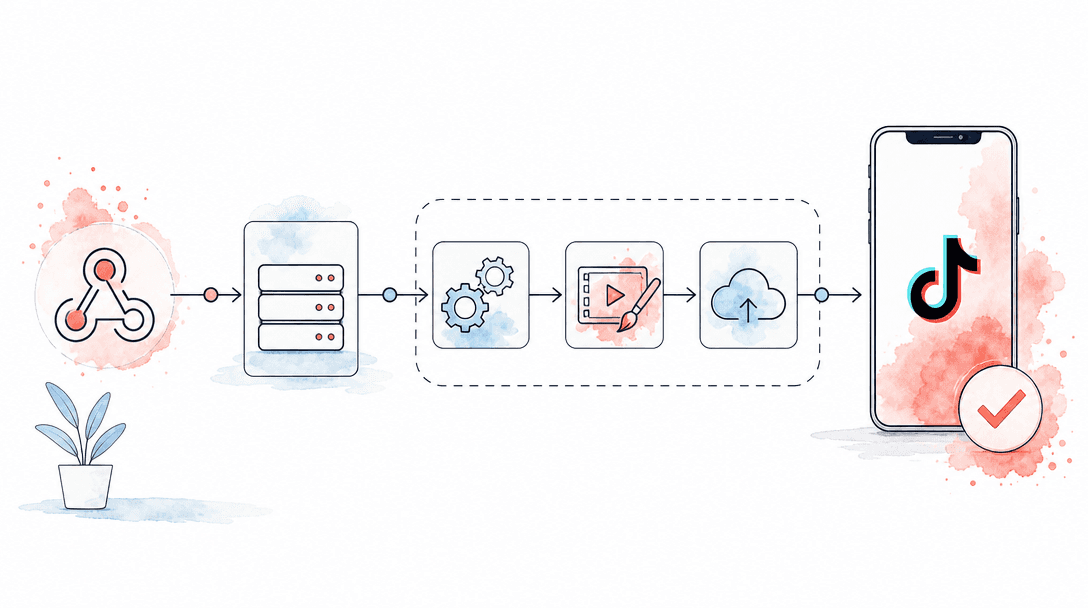
The clean pattern is: event source → webhook receiver → validation → queue → TokPortal API → status webhook → analytics store. The webhook should not post directly inside the request cycle. It should acknowledge fast, persist the job, and let a worker handle retries, account routing, and TokPortal API calls through TokPortal developer documentation.
- Event source: AI generator, DAM, CMS, Airtable, Notion, internal approval tool, or n8n workflow.
- Webhook receiver: your API route, serverless function, n8n Webhook node, Make webhook, or Zapier Catch Hook.
- Job payload: video asset URL, caption, language, target country, account group, schedule window, campaign ID, and callback URL.
- Posting call: TokPortal API request that turns the approved asset into a native TikTok post.
- Status callback: webhook updates for queued, accepted, posted, failed, or needs-review states.
Receive the video-ready webhook
Accept only events that mean the creative is final: rendered, approved, stored at a reachable URL, and assigned to a campaign. Reject drafts before they enter the posting queue.
Verify and normalize the payload
Check the webhook signature or shared secret, enforce required fields, convert campaign naming into account groups, and store the raw payload for auditability.
Create a durable posting job
Write the job to a database or queue before calling any external API. Include idempotency keys so duplicate webhooks do not create duplicate posts.
Call TokPortal’s posting API
Send the video URL, caption, destination account or account pool, target country, schedule window, and any native posting instructions supported by your TokPortal setup.
Listen for TokPortal status webhooks
Update your dashboard when a post is queued, accepted, posted, needs attention, or fails permanently. Treat status events as the source of truth for operations.
Store the published URL and performance metadata
Save the TikTok post URL, account ID, campaign ID, and downstream analytics so growth teams can compare creative, country, account age, and posting windows.
What is the right architecture for webhook-based social posting?
The right architecture separates event capture from posting execution. Webhooks are excellent at telling your system that a video is ready; they are weak as long-running posting workers because network timeouts, duplicate deliveries, and downstream throttling can happen in any distributed system.
A production TikTok pipeline should have five layers: ingress, validation, queue, posting worker, and callback processing. That structure also works for Instagram Reels and YouTube Shorts if your roadmap extends beyond TikTok. For a deeper social automation overview, see the complete guide to auto social media posting.
Feature
Fragile webhook script
Production posting pipeline
Webhook response
Duplicate events
Routing
Observability
Scale model
Do not confuse webhook automation with official API capability
How do you connect AI generator webhooks to the TokPortal API?
Connect an AI generator to TokPortal by treating the generator webhook as a creative completion event, not as a publish command. Sora, Veo, Kling, Runway, Pika, HeyGen, Creatify, Arcads, Captions, and similar tools can produce many variations; your pipeline decides which variants are approved, localized, and routed to which TikTok accounts.
The minimum payload should include asset_url, caption, language, campaign_id, country, account_group, approval_status, and callback_url. If your generator also returns thumbnails, speaker metadata, or brand-safety labels, store those fields for reporting even if they are not required for posting.
A practical rule: one AI render is not one distribution decision. A 30-video creative batch may become 10 posts in the USA, 6 in the UK, 4 in Germany, and 0 in Japan if language, product availability, or local trend fit fails review. For native sound workflows, pair this guide with how to add TikTok sounds via API using native in-app posting.
- Use a signed webhook or shared secret for generator events
- Require an approval_status field before a job becomes publishable
- Store every render URL even if only approved assets are posted
- Map generator projects to TokPortal campaign IDs
- Map target language and product availability to country routing
- Use account groups instead of hard-coding individual account IDs
- Attach callback URLs so status events return to the originating system
- Keep profile-image enrichment separate from the posting pipeline if your team uses utilities such as a TikTok profile picture downloader or TikTok pfp downloader for research assets
How do you post to TikTok from n8n via webhooks?
In n8n, use the Webhook node as the entry point, then add validation, transformation, approval, and HTTP Request nodes before calling TokPortal’s API. n8n is a good fit when growth teams need a visible workflow canvas and developers still want structured payloads, retries, and environment variables.
A reliable n8n flow looks like this: Webhook Trigger → IF approval check → Set normalized fields → HTTP Request to TokPortal → Wait for status webhook → Update Airtable/Sheets/DB → Slack alert. If you are choosing between workflow tools, TokPortal also supports Make and Zapier integrations, but developer-heavy teams usually outgrow no-code posting flows once they need idempotency, account pools, and custom analytics.
Use n8n for orchestration, not as the system of record. Your campaign database should still store account groups, country rules, credits, published URLs, and failure reasons. This keeps the workflow editable without losing operational history.
How should error handling work in webhook posting pipelines?
Error handling should be designed before the first campaign. Webhook systems fail in predictable ways: duplicate deliveries, expired video URLs, missing captions, account unavailability, unsupported country rules, late approvals, and downstream timeouts. The fix is not a larger timeout; it is a state machine.
Use clear job states: received, validated, queued, sent_to_tokportal, accepted, posted, needs_review, retrying, and failed_final. Every transition should be timestamped and attached to the original campaign ID. This gives your growth team an audit trail instead of a spreadsheet guessing game.
Error-handling rules that hold up
- Use idempotency keys based on campaign ID, asset ID, account group, and scheduled window
- Retry network failures with exponential backoff and a maximum retry count
- Classify errors as retryable, human-review, or permanent
- Expire jobs when the video URL or approval window is no longer valid
- Send status webhooks into a durable event log before updating dashboards
Pipeline mistakes to avoid
- Do not publish inside the initial webhook request cycle
- Do not assume webhook senders deliver events exactly once
- Do not route every creative to every account without country and niche rules
- Do not hide failed jobs from operators; surface the reason and the next action
- Do not let a no-code workflow become the only place campaign state exists
How do you scale webhook posts to many accounts?
To scale webhook posts to many accounts, stop thinking in single-account API calls and start thinking in account pools. Each job should target a pool defined by country, niche, account age, audience fit, posting capacity, and campaign priority. The worker then expands the job into account-level tasks with caps and schedule windows.
TokPortal supports distribution through real accounts on real physical smartphones with local SIM cards in 20+ countries. For large rollouts, combine webhook automation with account warming, country timing, and controlled posting velocity. The operational playbooks in scaling TikTok marketing with 100+ accounts and TikTok distribution at scale cover the account-side strategy.
Credit planning matters. TokPortal pricing uses 25 credits per account, 2 credits per video upload, 7 credits for niche warming, 40 credits for deep warming on Instagram, 3 credits for video editing, and 1 credit for sound-volume control. A webhook pipeline should check available credits before expanding one creative into dozens of posts.
20+
countries with real-device, local-SIM distribution coverage
150,000+
accounts under TokPortal management
4,276
active business clients using TokPortal infrastructure
6B+
organic video views generated through TokPortal campaigns
Original pipeline rule: fan out after approval, not after rendering
Webhook payload example for a TikTok posting job
A production payload should be boring, explicit, and easy to replay. Keep creative metadata, routing metadata, and callback metadata separate so your worker can validate each layer independently.
- creative.asset_url: signed or public video URL accessible by the posting worker.
- creative.caption: final caption, including approved hashtags and disclosure language where relevant.
- creative.sound_instruction: optional native in-app sound guidance if the campaign requires TikTok sounds.
- routing.country: target market such as USA, UK, Germany, France, Brazil, Japan, Mexico, or Australia.
- routing.account_group: logical group such as beauty_us_warmed, fintech_uk_creators, or gaming_japan_launch.
- schedule.window_start/window_end: acceptable posting window in local time.
- ops.idempotency_key: stable key preventing duplicate publishing from repeated webhook delivery.
- ops.callback_url: endpoint where TokPortal status updates should be sent.
If your workflow includes competitor or creator research assets, keep those utilities separate. A TikTok profile picture download or TikTok profile picture downloader workflow may help enrich internal research records, but it should not sit in the critical path for publishing approved campaign videos.
Build your webhook posting pipeline on TokPortal
Use TokPortal’s REST API, webhooks, MCP server, and TypeScript or Python SDKs to turn approved videos into native TikTok posts across real accounts and countries.
Can a webhook post directly to TikTok?+
Why use TokPortal instead of only the official TikTok Content Posting API?+
How do I prevent duplicate TikTok posts from repeated webhooks?+
Can I connect AI video generators to TokPortal webhooks?+
Is n8n enough for a TikTok posting pipeline?+
How many accounts can a webhook pipeline route to?+

Written by
Vincent Tellenne
Co-founder & CEO
Vincent is a co-founder and CEO of TokPortal. He works on the infrastructure and operating model behind scaled organic social media distribution.
Learn more about this topic with AI
Related Resources
Auto Social Media Posting: The Complete Guide
Learn how to set up auto social media posting with TokPortal. Automate TikTok & Instagram posts across real accounts in 30+ countries. Scale your content strategy today.
How to Post on TikTok via API in 2026 (Step-by-Step Working Guide)
Post videos to TikTok automatically with the official Content Posting API. Working examples, auth setup, sounds, scheduling — everything that works in 2026.
How to Scale TikTok Marketing with 100+ Accounts in 2026
Learn how to scale TikTok marketing with 100+ accounts using real devices, native posting, and account warming. Complete guide for brands and agencies running multi-account organic campaigns in 2026.
TikTok API Alternatives: When the Official API Isn't Enough
Explore the best TikTok API alternatives for content posting, account management, and automation. Learn when the official API falls short and what to use instead.
TikTok Distribution at Scale: The Infrastructure Guide
Learn how to build a scalable TikTok distribution infrastructure. From account farms to geo-targeting, this guide covers everything marketing pros need to grow at scale.
How to Add TikTok Sounds via API: Native In-App Posting Explained
Learn how to add TikTok sounds via API using TokPortal's native in-app posting. Add trending sounds, control volume levels, and use carousels — all programmatically.
From the guide to your first campaign
You make the content.
TokPortal runs the account operations.
Create and operate TikTok and Instagram accounts in your target market. Local operators handle the account work and native publishing. You control the brief, content and campaign from the dashboard, API or MCP.
- 01Choose your market
- 02Define each account
- 03Schedule your content
Review market availability and pricing before ordering. No reach forecast is built into your plan.